Guide
DXF Nesting: How to Fit More Parts on a Sheet
Nesting is laying out the parts you need on a sheet so they use as little metal as possible. Good nesting is the cheapest saving in a cutting shop: the steel you do not waste is steel you do not buy. This guide explains the rules in plain words — the gap, the edge margin, turning parts, pairing them — and how to check a nested file before it reaches the machine.
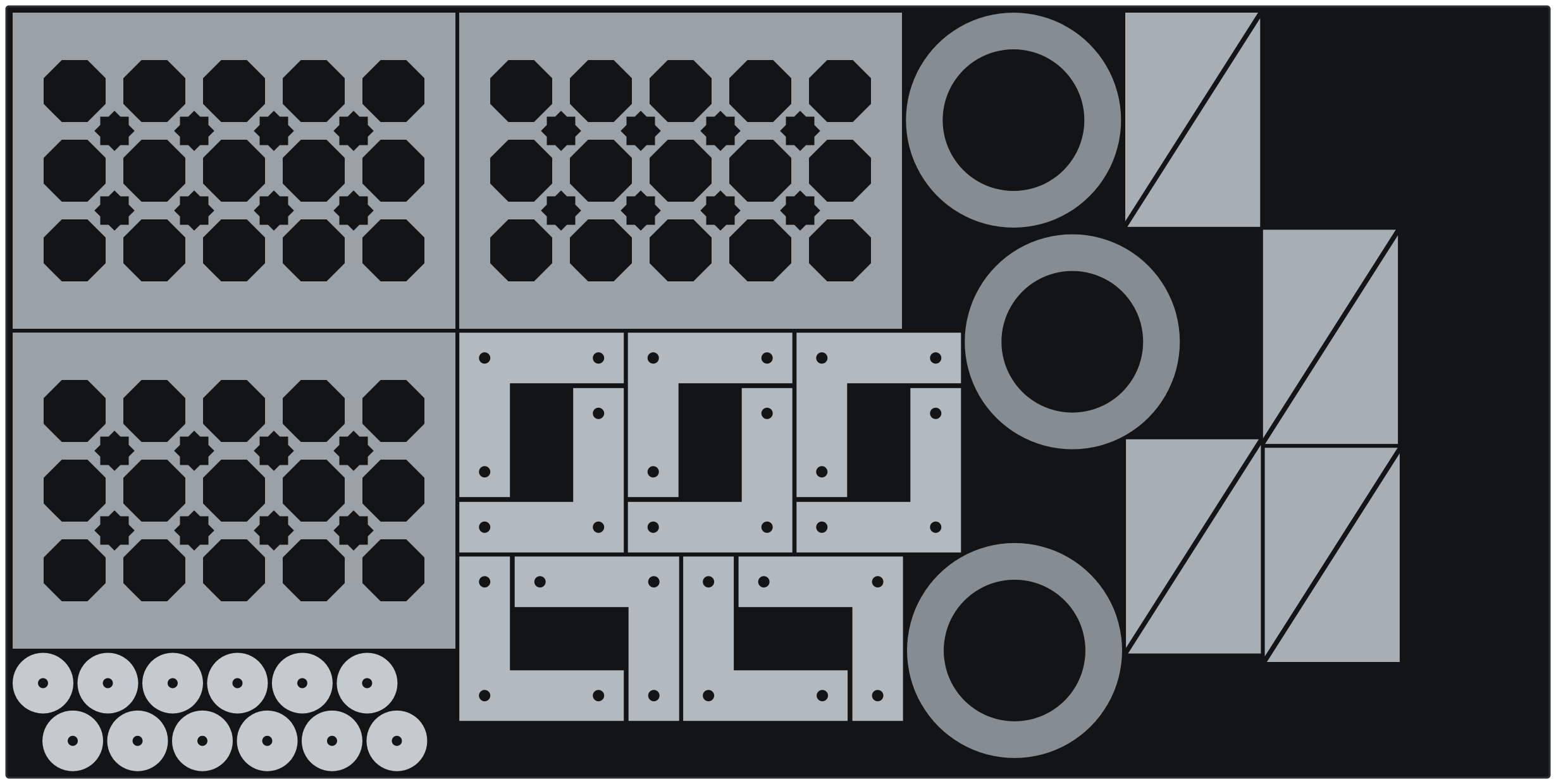
What nesting is — and why it pays
A sheet of steel costs the same whether you cut four parts from it or seven. Every part you fit on the sheet lowers the material cost of all the others, and whatever is left over only has value if it is left in one usable piece. Nesting has two goals: fit more parts on each sheet, and leave the leftover as one clean offcut instead of a sheet full of holes.
The two numbers you must set
The gap between parts. This is the strip of metal left between two neighbouring cuts. Too small, and the heat of one cut reaches the next part: edges round over, thin strips warp, and the skeleton of the sheet falls apart while the machine is still working. The right gap depends on your machine and your plate — thicker plate and plasma need more than thin sheet on a laser. Your machine supplier's cutting chart is the right source; if you have nothing to go on, start generous and tighten after a test cut.
The edge margin. Sheets are not perfectly square and are never placed perfectly straight. A margin kept clear all round the sheet means a small error in loading does not send a cut off the edge.
Five habits that fit more on a sheet
- Place the big parts first. Small parts fit into the spaces big parts leave — never the other way round.
- Turn the parts. A part that wastes space one way round often fits when turned a quarter turn. Only lock the direction when it matters — a brushed finish, a visible grain, or a pattern that must run one way.
- Pair parts that hook together. Two L-shaped brackets, one turned half a turn, lock into a tight rectangle. Two triangles make a rectangle. Pairing is the single biggest saving on shapes like these.
- Use the big waste holes. The cut-out in the middle of a ring or a frame is scrap anyway. A small part can be cut from it for free.
- Fill from one end. Pack parts from one short edge of the sheet, so what is left is a full-width offcut you can put back on the rack.
What nesting must never do
A nested part must be exactly the part you drew. Nesting may move a part and turn it — nothing else. It must never scale a part, mirror it (lettering would read backwards, and a left-hand bracket would become a right-hand one), or change a single hole. If your nesting tool does anything else, check the result against the original before you cut.
Check the nested file before you cut
- Count the parts. Every part you asked for is on a sheet — none dropped quietly because it did not fit.
- Measure the smallest gap. Not the gap you typed — the real smallest distance between any two parts in the finished layout.
- Measure the distance to the edge. The closest any part comes to the sheet edge.
- Every outline closed, units in millimetres. The same checks as any cutting file — see the cut-ready DXF checklist.
- Inside cuts first. Holes are cut before the outline that frees the part, or the part can shift before its holes are done. Most CAM software orders this for you; check that yours does.
How KraftDXF nests
In the KraftDXF app every finished job has a Nest button. Add the jobs you need — pattern panels, converted designs, sets of separate parts, in any mix — say how many of each, choose your sheet, gap and margin, and the tool lays them out. Rectangular panels are placed with exact arithmetic. Other shapes are nested by their true outline, so parts tuck into each other's corners, lock together in pairs and sit inside big waste holes. Then the finished layout is measured: the real smallest gap, the real distance to the edge, every outline read back from the file. If the measurement does not pass, no file is made. A layout that needs more than one sheet gives you one file per sheet, and the leftover offcut is reported in millimetres.
Parts are only moved and turned — never scaled, mirrored or edited. The plate rules themselves (bridges at least 2× the plate thickness, no floating islands) were already checked when each part was made.
Nest your next sheet in a minute
Make or convert your parts, tap Nest, set the quantity. Previews, checks and nesting are free — you only pay when you take a DXF, and a whole nested layout counts as one file.
Open the app — first 5 files freeNot ready to draw anything? The free sheet calculator tells you how many rectangular parts fit on a sheet and what each one costs in steel — no sign-in.
Common questions
What is nesting in laser and plasma cutting?
Nesting is arranging the parts you need on a sheet so they use as little material as possible, with a set gap between parts and a margin to the sheet edge. A good nest fits more parts on each sheet and leaves the leftover as one usable offcut.
How much gap should I leave between nested parts?
It depends on your machine and plate: thicker plate and plasma cutting need a wider gap than thin sheet on a laser, because more heat goes into the metal between the cuts. Use your machine supplier's cutting chart, or start with a generous gap and tighten it after a test cut.
Is it safe to rotate parts when nesting?
Yes, unless direction matters for the finished part — a brushed finish, a visible grain, or a pattern that must run one way. Turning a part does not change it. Mirroring does, and a nesting tool should never mirror a part.
Can small parts be cut from the holes of bigger parts?
Yes. The cut-out inside a ring or frame is scrap, so a small part nested inside it costs no extra material. The same gap rule applies between the small part and the edge of the hole, and inside parts should be cut before the part around them.
Does KraftDXF check a nested layout?
Yes. After laying out the parts, KraftDXF measures the real smallest gap between parts and the real distance to the sheet edge on the finished outlines, and reads the file back. If a measurement fails, no file is made.